

Our Verdict
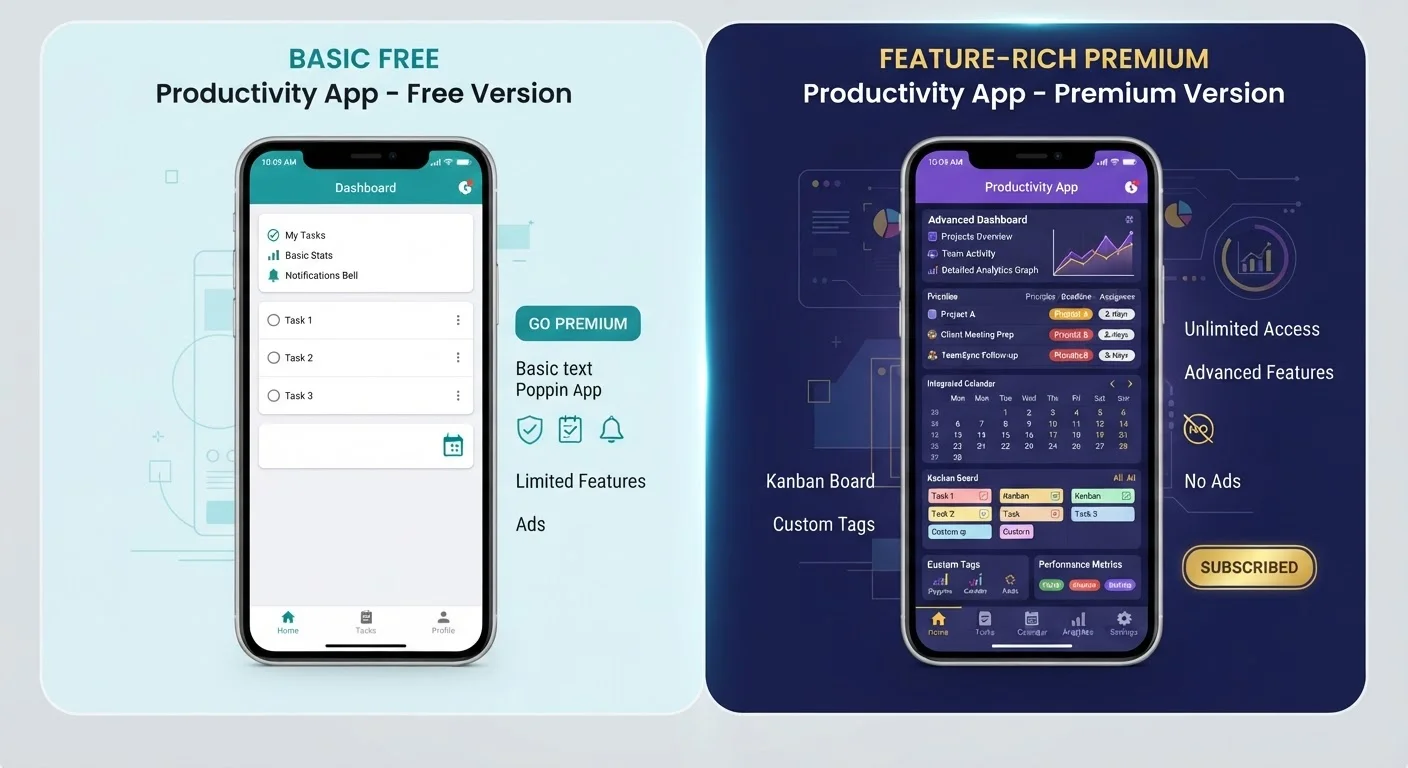
Free tiers cover most casual use cases well, especially for apps you open infrequently. A paid upgrade earns its cost when the free plan's restrictions - ads, storage caps, or feature locks - consistently interrupt the way you actually use the app. Before upgrading, audit whether you've hit those limits repeatedly, not just once.
| Best for | Recommended |
|---|---|
| Occasional or light users | Free tier |
| Power users who rely on the app daily | Paid tier |
| Teams or households sharing an account | Paid family or team plan |
| Those trialling a new app category | Free tier first, upgrade later if needed |
How Freemium Models Actually Work
The freemium model - offering a free baseline with optional paid upgrades - is now the dominant distribution strategy for consumer apps. The free tier is intentionally designed to deliver real value while stopping short of the full experience. That gap is where the business lives.
Free tiers are typically limited in one or more of four ways: storage caps (cloud services that cut you off at 5-15 GB), feature locks (editing tools, templates, or integrations reserved for subscribers), usage limits (a set number of exports, AI queries, or projects per month), and advertising (banner or audio ads that interrupt the experience). Understanding which type of limit a free tier imposes helps you judge whether the paid upgrade addresses something you'd actually notice. For more on how recurring charges can quietly add up, see what app subscriptions are costing you each month.
What You Typically Gain by Upgrading
Paid tiers vary widely, but most upgrades cluster around a predictable set of improvements:
- Ad-free experience: The most immediately noticeable change. For streaming music or podcast apps, removing mid-content ads can significantly improve the experience.
- More storage: Cloud storage, note-taking, and file apps often make storage the core upgrade incentive. If you're near your free cap, the paid plan is doing real work for you.
- Offline access: Many apps - maps, reading apps, music services - restrict offline use to paid plans. If you travel frequently or have unreliable connectivity, this matters.
- Advanced features: Productivity and creative apps often lock their most useful tools behind a paywall: version history, collaboration features, AI-powered suggestions, or automation rules.
- Priority support: Faster customer service response times are a common perk, though for most personal apps this is rarely a deciding factor.
| Free Tier | Paid Tier | |
|---|---|---|
| Cost | $0 | Typically $3-$15/month |
| Ads | Usually present | Typically removed |
| Storage | Capped (often 5-15 GB) | Expanded or unlimited |
| Offline access | Often restricted | Usually included |
| Advanced features | Locked or limited | Unlocked |
| Best for | Casual or infrequent users | Daily or power users |
One thing paid tiers generally do not offer: better privacy by default. The payment relationship changes the business model somewhat, but it doesn't automatically mean less data collection. It's worth reading an app's privacy policy regardless of which tier you use. See also what app permissions mean and why they matter.
How to Decide If an Upgrade Is Worth It
The cleanest test: have you hit the free tier's limits more than once in the past month? A single frustrated moment is rarely a good reason to add a recurring charge. A pattern of friction is.
Ask yourself these questions before upgrading:
- Which specific feature or limit is bothering me - and is it actually in the paid plan?
- How often do I open this app each week?
- Is there a free alternative that removes this particular constraint?
- Does the annual plan cost significantly less than paying month to month?
Use Free Trials Strategically
Most paid apps offer a 7- to 30-day free trial. Use that window intentionally - actually push the premium features to their limits and simulate your real usage patterns. If you reach the end of the trial without using the unlocked tools regularly, that's a clear signal the free tier is probably right for you.
Monthly billing is flexible but more expensive over a year. Annual plans commonly run 30-50% cheaper per month, though they require an upfront commitment. If you're unsure you'll use an app long-term, start monthly and switch once you've confirmed the habit. And if you're thinking about how subscriptions affect your broader monthly budget, the same discipline that applies to carrying a credit card balance applies here - recurring small charges compound quickly.
When the Free Tier Is Genuinely Enough
For many everyday use cases, the free tier is designed to be serviceable - and it is. A free note-taking app is fine if you're storing a grocery list, not managing a research project. A free video editor covers basic trimming without needing export limits if you only share a few clips a year.
The free tier wins when: you use the app casually or infrequently, the ads are skippable or minimal, the storage cap is nowhere near your usage, and the locked features are genuinely not part of your workflow. Before upgrading anything, it's also worth checking what your phone already provides - your smartphone's built-in apps cover a surprisingly wide range of tasks at no extra cost. Many people pay for apps that duplicate what they already have.
This article is for general informational purposes only and does not constitute financial or purchasing advice. Subscription pricing and features change frequently - verify current terms directly with the app provider before committing.
The content on this site is for informational purposes only and is not a substitute for professional advice. Always consult a qualified professional for guidance specific to your situation.