

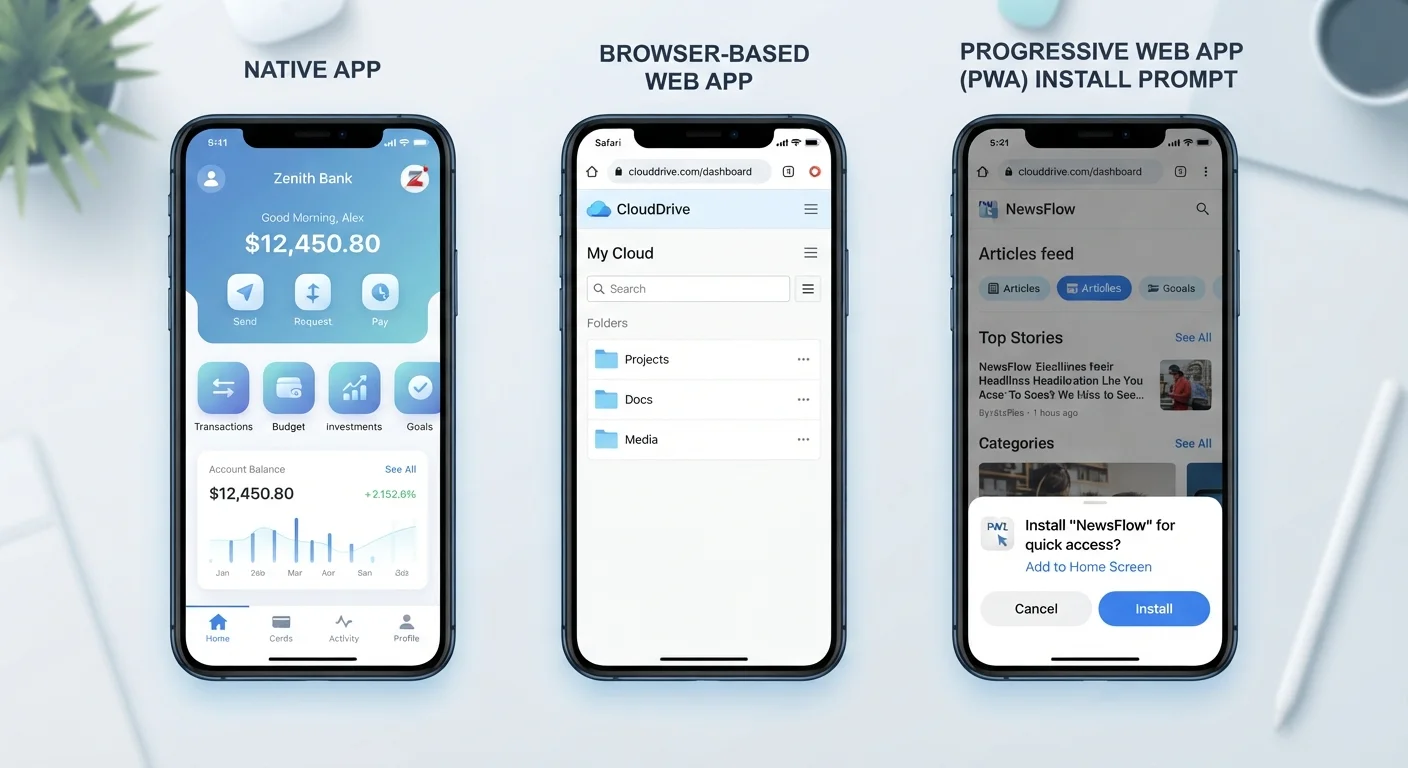
What Actually Makes an App "Native"?
When you download an app from the Apple App Store or Google Play, you're almost certainly getting a native app. These are built using programming languages and tools designed specifically for one operating system - Swift or Objective-C for iOS, Kotlin or Java for Android.
Because native apps are compiled for a specific platform, they can tap directly into your device's hardware: camera, GPS, accelerometer, Bluetooth, and more. That's why your maps app can track your location in real time, or your fitness app can monitor your movement in the background. Native apps are also cached locally, so many features work even when you're offline.
The trade-off? Developers have to build and maintain separate versions for iOS and Android. And for you, native apps occupy storage space on your device. That said, for performance-heavy use cases - gaming, video editing, real-time navigation - native remains the gold standard. It's also worth understanding how native apps interact with your device's permissions system. See what app permissions actually mean for a closer look at what you're granting when an app asks for access.
Web Apps: Nothing to Install, Everything in the Browser
A web app is essentially a website that behaves like an application. You access it through a browser - Chrome, Safari, Firefox - and it runs entirely over the internet. There's nothing to download, no app store involved, and it works across virtually any device with a browser.
Think of your bank's online portal, a web-based email client, or a project management tool you use at work. These are almost always web apps. Updates happen silently on the server side, so you're always using the latest version without any action on your part.
~55%
Global web traffic from mobile devices
According to Statcounter data, mobile devices consistently account for over half of worldwide web browsing, underscoring why app format and mobile performance matter.
3.5M+
Apps available in major app stores combined
Apple's App Store and Google Play together host millions of native apps, though the total number fluctuates as apps are added and removed regularly.
~50%
Reduction in data usage reported by some PWAs vs. native apps
Google has documented cases where switching to a PWA significantly reduced data consumption, though results vary widely depending on the specific app and use case.
The limitations are real, though. Web apps generally can't access hardware features as deeply as native apps, and they depend on a stable internet connection to function. They also live in the browser's sandbox environment, which restricts what they can do in the background. If you're managing files across these kinds of tools, understanding where your data is stored can help clarify what's happening behind the scenes.
Progressive Web Apps: The Hybrid Approach
Progressive web apps (PWAs) emerged as a way to close the gap between native and web. Built using standard web technologies, PWAs can be accessed through a browser like any web app - but they also support installation on your home screen, offline functionality, and push notifications.
When you visit a PWA-enabled site on your phone, you may see a prompt asking if you'd like to "add to home screen." Doing so creates an icon that opens the app in a full-screen experience, without the browser's address bar, making it feel much closer to a native app. Behind the scenes, PWAs use a piece of code called a service worker - a script that runs separately from the main page and handles background tasks like caching content for offline use.
Not Sure If an App Is a PWA?
Open the site in your mobile browser and look for a prompt to "Add to Home Screen" or an install icon in the address bar. If it appears, the site is likely built as a PWA. You can also check your browser's settings menu - on Chrome, an option to install the site as an app will appear if PWA features are detected.
Retailers, news platforms, and productivity tools have widely adopted PWAs because they reduce the friction of requiring a full download while still offering a richer experience than a basic website. For most everyday tasks - checking a news feed, shopping, using a lightweight productivity tool - a PWA often performs comparably to a native app. If you're thinking about which tools you actually need on your device, this guide to managing your digital life offers practical perspective.
How Format Shapes Your Everyday Experience
You probably switch between all three app formats throughout a single day without realizing it. Checking your phone's built-in calendar? That's a native app. Filing an expense report through your company's browser portal? Web app. Reading news through an icon you added to your home screen? Likely a PWA.
Format influences several things you might have noticed but never had a label for: why some apps drain your battery faster, why certain tools work on a plane without Wi-Fi, or why some apps take up gigabytes while others seem to take up nothing. It also explains why some apps look and feel slightly different on Android versus iPhone - native apps are tuned for each platform, while web and progressive apps aim for consistency across devices.
For a broader picture of the software already living on your phone, a walkthrough of your smartphone's built-in apps is a useful companion read. Understanding the format behind an app won't change how you use it day-to-day, but it will help you make more informed decisions about what to install, what to skip, and why a tool behaves the way it does.
Frequently Asked Questions
A native app is downloaded and installed directly onto your device, built specifically for iOS or Android. A web app runs inside a browser and doesn't require installation. Native apps typically have faster performance and deeper access to device hardware, while web apps are more universally accessible across platforms.
Yes, many PWAs can work offline or with limited connectivity by caching content on your device. However, the extent of offline functionality varies by app - some cache everything, others only cache basic interface elements. Full functionality usually still requires a connection.
Not necessarily. Both formats can be built securely or poorly. Native apps go through app store review processes, which adds a layer of vetting, but that doesn't guarantee safety. Web apps rely on browser security protections. The security of any app depends heavily on how its developers built and maintain it.
That prompt typically comes from a progressive web app (PWA). Adding it to your home screen gives it an app-like presence on your device without a full app store installation. It allows faster access and may enable offline features, but it's entirely optional.
Native apps typically use the most storage since they're fully installed on your device, including all assets and data. Web apps use virtually no device storage themselves. PWAs land in the middle - they cache some content locally but are far lighter than a full native install.
Modern browsers allow web apps to request access to certain hardware features like your camera, microphone, and location - but only with your explicit permission. They generally have more limited hardware access than native apps, especially for background processes or advanced sensors.
The content on this site is for informational purposes only and is not a substitute for professional advice. Always consult a qualified professional for guidance specific to your situation.