

Option A
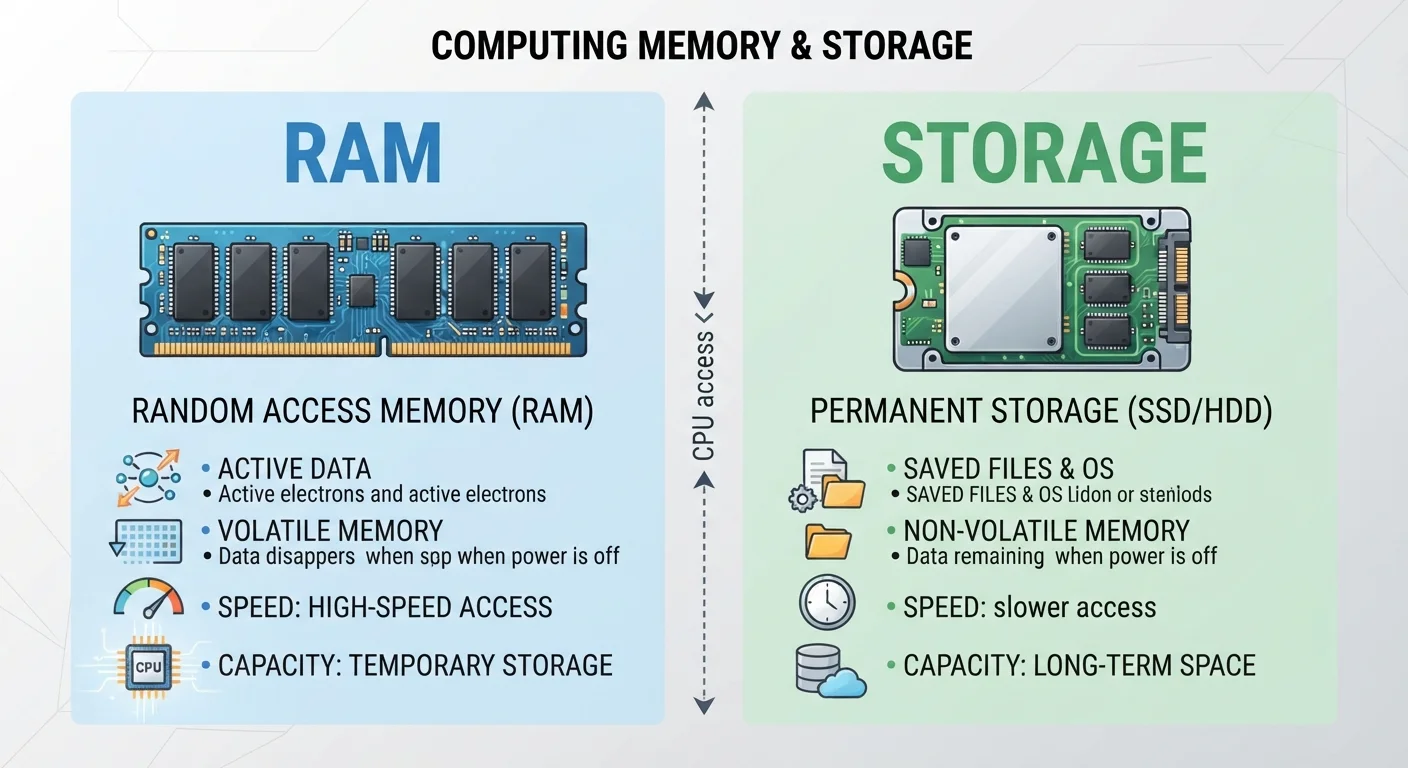
RAM (Random Access Memory)
Your device's short-term working memory.
Best for: Handling everything your device is actively doing right now - open apps, running processes, and live multitasking.
Option B
Storage (SSD or HDD)
Your device's long-term filing cabinet.
Best for: Holding all your files, apps, photos, and the operating system permanently, even when the device is powered off.
The Confusion Is Completely Understandable
Ask most people what the difference is between RAM and storage, and you'll get a shrug. Both are advertised in gigabytes (GB). Both show up in the spec sheet of every phone, laptop, and tablet. And both sound vaguely like "memory." So it's no surprise consumers conflate them.
The confusion has real consequences. Someone might buy a device with 512 GB of storage thinking it will run faster - when what they actually needed was more RAM. Or they'll blame slow performance on "not enough storage" when the culprit is something else entirely. Getting these two concepts straight makes you a smarter device buyer and a better troubleshooter when things go wrong.
For related context on how another core component works, see our explainer on what a CPU actually does - the processor, RAM, and storage all work together inside every device you own.
What RAM Actually Does
RAM - short for Random Access Memory - is your device's short-term workspace. When you open an app, your device loads the data it needs from storage into RAM so the processor can access it instantly. RAM is extremely fast but also temporary: the moment you power off your device, everything in RAM disappears.
Think of RAM as a physical desk. The bigger the desk, the more projects you can spread out and work on at the same time. When your desk gets full, you have to put something away before starting something new - which is why low-RAM devices slow down when you have too many apps open.
| Criterion | RAM | Storage |
|---|---|---|
| Purpose | Active working memory | Permanent file and data holding |
| Data persistence | Erased when device powers off | Retained when device is off |
| Speed | Extremely fast | Slower (SSDs faster than HDDs) |
| Typical consumer range | 4 GB - 32 GB | 64 GB - 2 TB |
| What it affects | Multitasking and app responsiveness | How much you can save on the device |
| Upgradeable? | Sometimes (desktop PCs, some laptops) | Often (external drives, cloud expansion) |
Common RAM amounts for consumer devices today range from 4 GB (basic smartphones) to 16 GB or more (mid-range to high-end laptops). If your device feels sluggish when switching between apps, RAM is often the first place to investigate.
What Storage Actually Does
Storage - whether it's a solid-state drive (SSD) in a modern laptop or the internal flash memory in your phone - is where data lives permanently. Your operating system, every app you've installed, every photo you've taken, and every file you've downloaded all live in storage.
Unlike RAM, storage retains its contents when the device is off. Using the desk analogy: if RAM is your desk, storage is the filing cabinet beside it. A bigger filing cabinet means you can keep more stuff - but it doesn't make you work any faster at the desk itself.
Storage capacity for consumer devices typically ranges from 64 GB on entry-level phones to 1 TB (terabyte) or more on high-end laptops. Speed also matters here: SSDs retrieve files much faster than older hard disk drives (HDDs), so storage type affects how quickly apps launch and files open - but that's still distinct from what RAM does. For more on where your files actually live, see cloud storage vs. local storage explained.
Why the Gigabyte Label Misleads People
The single biggest reason for the RAM vs. storage mix-up is that both are measured in the same unit: gigabytes. A phone might advertise "8 GB + 128 GB" - that's 8 GB of RAM and 128 GB of storage - but not every retailer or ad spells that out clearly.
8 GB
Typical baseline RAM in mid-range laptops
Most mainstream consumer laptops sold today ship with 8 GB of RAM as a standard starting point, according to common device specifications across major manufacturers.
256 GB
Common baseline SSD storage in laptops
Entry to mid-range laptops frequently ship with 256 GB SSDs, though higher-tier models often offer 512 GB or 1 TB options.
~10x
Speed advantage of RAM over SSD access
RAM access speeds are generally estimated to be many times faster than even high-performance SSDs, which is why active data must be loaded into RAM to be usable.
Manufacturers and retailers have gradually gotten better at labeling these separately, but spec sheets still require careful reading. When you see two numbers listed for a device, the smaller one is almost always RAM and the larger one is storage. An 8 GB / 256 GB laptop, for example, has 8 GB of RAM and 256 GB of storage space.
Understanding the difference between syncing and backing up is another related concept that hinges on understanding what storage is - and where your files actually end up.
The content on this site is for informational purposes only and is not a substitute for professional advice. Always consult a qualified professional for guidance specific to your situation.