

Our Verdict
Fiber delivers the strongest all-around performance — fastest speeds, lowest latency, and most consistent reliability. Cable is a capable alternative where fiber isn't available, though shared-bandwidth slowdowns are a real trade-off. DSL remains the fallback option for areas without better infrastructure, offering basic connectivity where nothing else reaches.
| Best for | Recommended |
|---|---|
| Households that stream, game, or work from home regularly | Fiber |
| Urban and suburban areas where fiber hasn't arrived yet | Cable |
| Rural or underserved areas with limited infrastructure choices | DSL |
What 'Broadband' Actually Means
The word broadband is used loosely in everyday conversation, but it has a specific meaning. Broadband refers to any high-speed internet connection that is always on — as opposed to older dial-up connections that tied up your phone line and connected only when you needed them. The Federal Communications Commission (FCC) defines broadband as a connection capable of at least 25 Mbps download and 3 Mbps upload, though many experts argue that threshold is outdated for modern households.
Fiber, cable, and DSL are all types of broadband. What separates them is the physical infrastructure used to carry your data — and that infrastructure directly shapes the speed, reliability, and latency you experience every day. Understanding what download speed, upload speed, and latency each control will help you judge which connection type truly fits your household.
How Each Connection Type Works
Fiber Optic
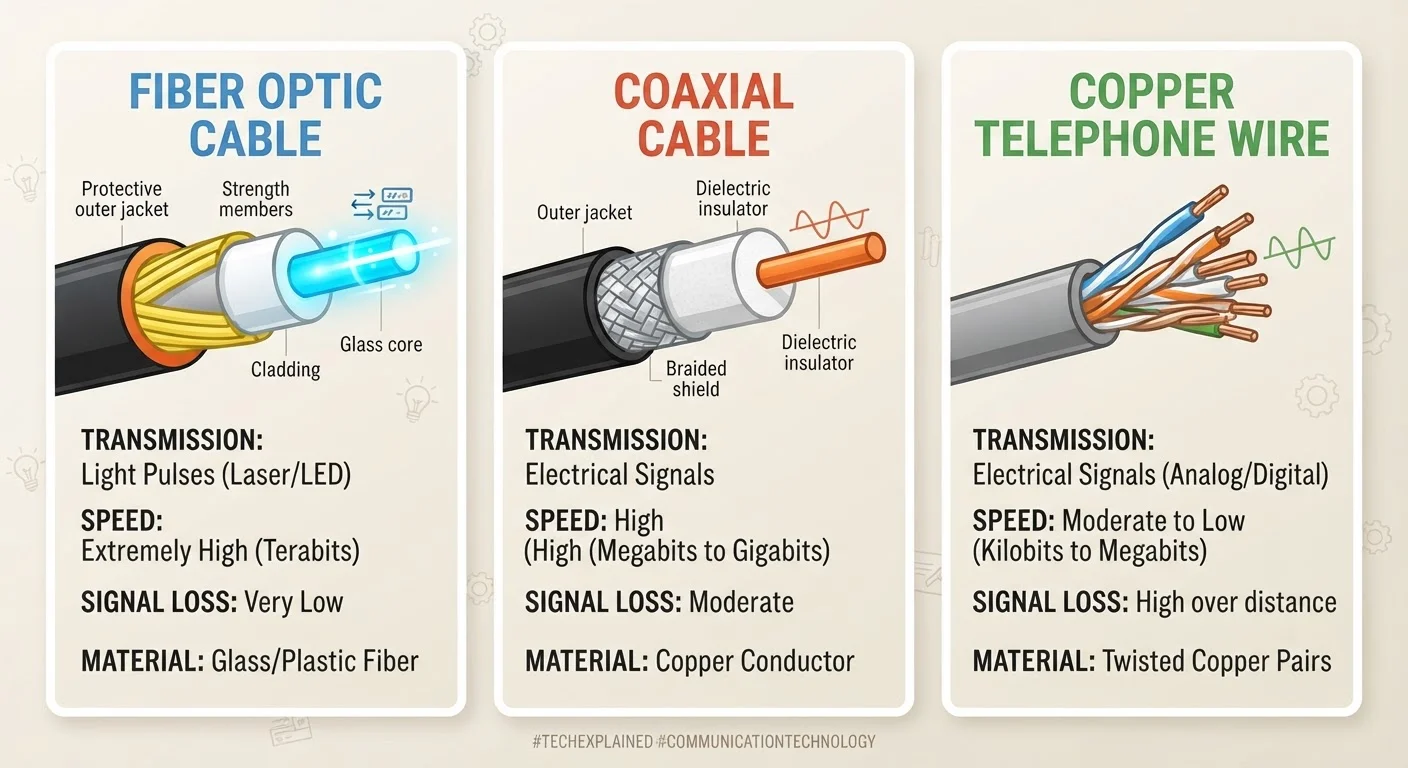
Fiber optic internet transmits data as pulses of light through thin strands of glass or plastic. Because light travels at — well, the speed of light — fiber is capable of symmetrical speeds (equal download and upload) that can reach 1 Gbps or higher. It is also far less susceptible to interference and signal degradation over distance than older technologies.
Cable
Cable internet uses the same coaxial cable infrastructure that delivers cable TV. It can achieve strong download speeds — often 200 Mbps to 1 Gbps — but upload speeds are typically much slower. Critically, cable networks are shared: your neighborhood connects through the same line segment, so congestion during peak hours (typically evenings) can noticeably reduce your speeds.
DSL
DSL (Digital Subscriber Line) transmits data over traditional copper telephone lines. It is widely available, including in rural areas where fiber and cable haven't reached, but speeds are significantly lower — commonly ranging from 1 Mbps to 100 Mbps depending on your distance from the provider's central office. The further you are from that facility, the weaker the signal and the slower the connection.
| Fiber | Cable | DSL | |
|---|---|---|---|
| Typical download speed | 200 Mbps – 1+ Gbps | 100 Mbps – 1 Gbps | 1 Mbps – 100 Mbps |
| Typical upload speed | Equal to download | Much slower than download | Slower than download |
| Latency | Very low | Low to moderate | Moderate to high |
| Consistency | Very consistent | Can slow at peak hours | Degrades with distance |
| Infrastructure | Glass/fiber strands | Coaxial cable | Copper phone lines |
| Availability | Cities and newer suburbs | Urban and suburban areas | Widely available, incl. rural |
Real-World Performance: What You'll Actually Notice
Spec sheets rarely tell the full story. Here's how the differences play out in daily use:
- Video calls and remote work: Fiber's symmetrical speeds shine here. Cable's slow upload speeds can cause choppy video or delayed file transfers. DSL may struggle with multiple simultaneous video calls.
- Streaming: Cable handles HD and 4K streaming well under normal conditions. Fiber is more consistent. DSL at lower speeds may buffer frequently on 4K content.
- Gaming: Latency matters more than raw speed for online gaming. Fiber typically delivers the lowest latency. Cable is acceptable. DSL latency can be higher and less predictable.
- Multiple users: A fiber connection handles many simultaneous devices with little strain. Cable can degrade noticeably during family peak hours. DSL's limited bandwidth gets divided quickly.
If you've ever wondered why your internet slows down at certain times, your connection type is often part of the explanation.
Check Your Actual Speeds Regularly
Your subscribed plan tier and your real-world speeds can differ significantly. Run a speed test at different times of day — once in the morning and once during evening peak hours. A large gap between those two readings is a sign your cable connection may be experiencing network congestion. Knowing your baseline helps you identify whether a problem is your connection type, your equipment, or something else entirely.
Availability and What to Do If Your Options Are Limited
The uncomfortable reality is that your connection type is often chosen for you by geography, not preference. Fiber remains largely concentrated in cities and newer suburbs. According to the FCC's broadband data, tens of millions of Americans — particularly in rural areas — still lack access to high-speed fiber or cable service.
If fiber isn't available in your area, cable is generally the stronger choice over DSL. If neither is available, DSL may be your only wired option — though fixed wireless and satellite internet are also worth investigating as alternatives.
Advertised Speeds Are Maximum Estimates
Internet providers advertise peak or theoretical maximum speeds, not guaranteed everyday performance. Cable customers sharing a neighborhood node may see speeds well below advertised rates during busy periods. DSL users more than a mile from their provider's central office often experience speeds a fraction of the plan's stated maximum. Always check user reviews and independent speed data for your specific address and provider before committing to a plan.
Regardless of which connection type you have, the equipment inside your home also matters. Your router and modem are separate devices with distinct roles — an outdated modem can bottleneck even a fast fiber connection. For a deeper look at how these devices work together, see our breakdown of routers, modems, and gateways.
The content on this site is for informational purposes only and is not a substitute for professional advice. Always consult a qualified professional for guidance specific to your situation.