

Why Fakes Are Harder to Spot Than You'd Think
Phishing emails, smishing texts, and copycat websites have grown far more convincing over the past decade. Modern scams often replicate brand logos, use near-perfect grammar, and even spoof sender names so the display name looks exactly right. The difference between a real message and a fake one can come down to a single character in a URL or a slightly off tone in the wording.
Understanding the specific red flags - not just a vague sense that something "feels wrong" - puts you in a much stronger position. The warning signs below are the ones that security professionals consistently identify across email, SMS, and website scams. For a deeper look at how these attack types differ from one another, see Phishing, Smishing, and Vishing: What Each One Means.
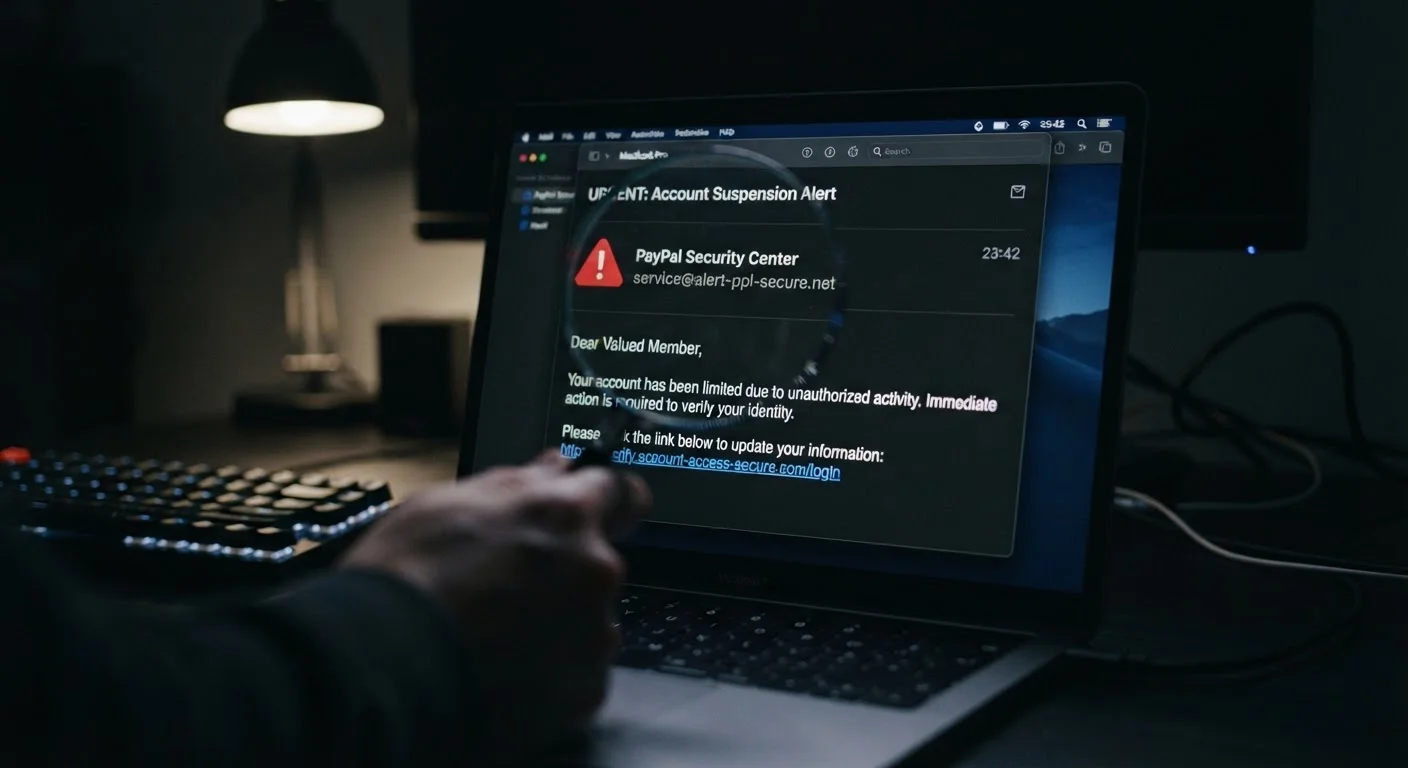
The sender address doesn't match the organization's real domain
The display name of an email can say anything - "PayPal Support" or "IRS Notices" - but the actual sending address tells the truth. Look past the friendly name and check the full email address. A legitimate message from a bank will come from its known domain (e.g., @yourbank.com), not from a free email service or a domain like yourbank-secure-alerts.net.
Common tricks include replacing letters with numbers (rn instead of m), adding words around the real domain (paypal.account-verify.com), or using a country-code domain that doesn't match the company's home market.
The display name can say anything - the actual sending address is where the truth lives.
The message creates artificial urgency or fear
"Your account will be closed in 24 hours." "Immediate action required." "You have an unpaid debt - respond now to avoid legal action." These phrases are engineered to make you act before you think. Genuine organizations - banks, government agencies, retailers - almost never communicate with language designed to panic you.
When a message triggers a strong emotional reaction, treat that feeling itself as a warning signal. Slow down rather than speed up. Urgency is the scammer's most reliable tool.
Urgency language is designed to make you act before you think - slow down instead.
It requests sensitive information directly
Legitimate services do not ask for your password, full Social Security number, credit card CVV, or bank login credentials through an email or text message. If a message asks you to provide this information - or to click a link and enter it - that is a near-certain sign of a scam.
This applies even if the request appears to come from a company you do business with. A real organization can verify your identity through its own secure, authenticated app or website portal without needing you to hand over credentials via an unverified channel.
Legitimate services never ask for your password or full financial details through email or text.
The link destination doesn't match what's displayed
On a desktop browser, hovering your cursor over a hyperlink (without clicking) shows the actual destination URL at the bottom of the screen. On mobile, pressing and holding a link usually reveals the real address. If the displayed text says "Click here to verify your Chase account" but the URL points to a domain unrelated to Chase, do not proceed.
Also watch for URL shorteners (bit.ly, tinyurl.com, etc.) in unexpected contexts - they hide the true destination. When a link arrives in an unsolicited message, shortening is a reason to be cautious, not reassured.
Hover over links before clicking - the real destination URL often tells a very different story.
The website URL has subtle differences from the real one
Fake websites frequently use domains that look almost identical to legitimate ones: amaz0n.com, apple-id-verify.com, or microsoftsupport.net. These are called typosquatting or lookalike domains. Always check the full URL in the address bar - especially the main domain name and the extension (.com, .org, .gov).
Note that HTTPS and the padlock icon do not mean a site is trustworthy. They only mean the connection is encrypted. Scam sites routinely obtain HTTPS certificates and will display the padlock just as a legitimate site does.
HTTPS and a padlock icon confirm encryption, not legitimacy - scam sites use them too.
The design or language quality is inconsistent
While many modern scams are polished, signs of low-quality execution still appear: mismatched fonts, pixelated logos, awkward phrasing, or unusual capitalization. Grammar and spelling errors - particularly in formal communications from financial or government entities - are a reliable indicator something is off.
Also watch for generic greetings like "Dear Customer" or "Dear User" in messages that should know your name. Most legitimate services personalize at least the salutation when contacting account holders.
Generic greetings like 'Dear Customer' in account messages are a quiet but consistent red flag.
The message arrives through an unexpected or mismatched channel
If your bank normally communicates through its app or official email, a sudden text from an unknown number claiming to be that bank warrants extra scrutiny. Scammers sometimes use SMS because users tend to trust texts more than cold emails, and the smaller screen makes it harder to inspect links carefully.
Similarly, if a government agency that communicates only by postal mail suddenly contacts you via text or social media direct message, that mismatch is itself a red flag. Knowing each institution's normal communication patterns helps you spot deviations quickly.
A message arriving through an unexpected channel is itself a reason to verify before engaging.
Building the Habit of Skeptical Checking
Each of the warning signs above takes only seconds to check once it becomes habit. The goal is not to be suspicious of everything - it is to pause briefly before you click, submit, or reply, and run through the most telling signals. Most legitimate organizations will never fault you for verifying through a separate channel before acting.
Scammers rely heavily on psychological pressure rather than technical tricks - something explored in more detail in How Scammers Use Social Engineering to Bypass Your Common Sense. It is also worth knowing which widely held beliefs about online safety can actually leave you more exposed - Things People Believe About Online Safety That Simply Aren't True walks through the most common misconceptions.
When in doubt, go directly to the source
If a message claims to be from your bank, insurer, or a government agency, do not use the contact details or links provided in that message. Instead, open a new browser tab and navigate directly to the organization's official website, or call the number printed on the back of your card or a previous paper statement. This bypasses any fake infrastructure entirely and confirms whether the communication was genuine.
No single red flag is definitive on its own, but two or more appearing together in the same message or site should be treated as a serious caution. Trust the pattern, not just one data point.
The content on this site is for informational purposes only and is not a substitute for professional advice. Always consult a qualified professional for guidance specific to your situation.