

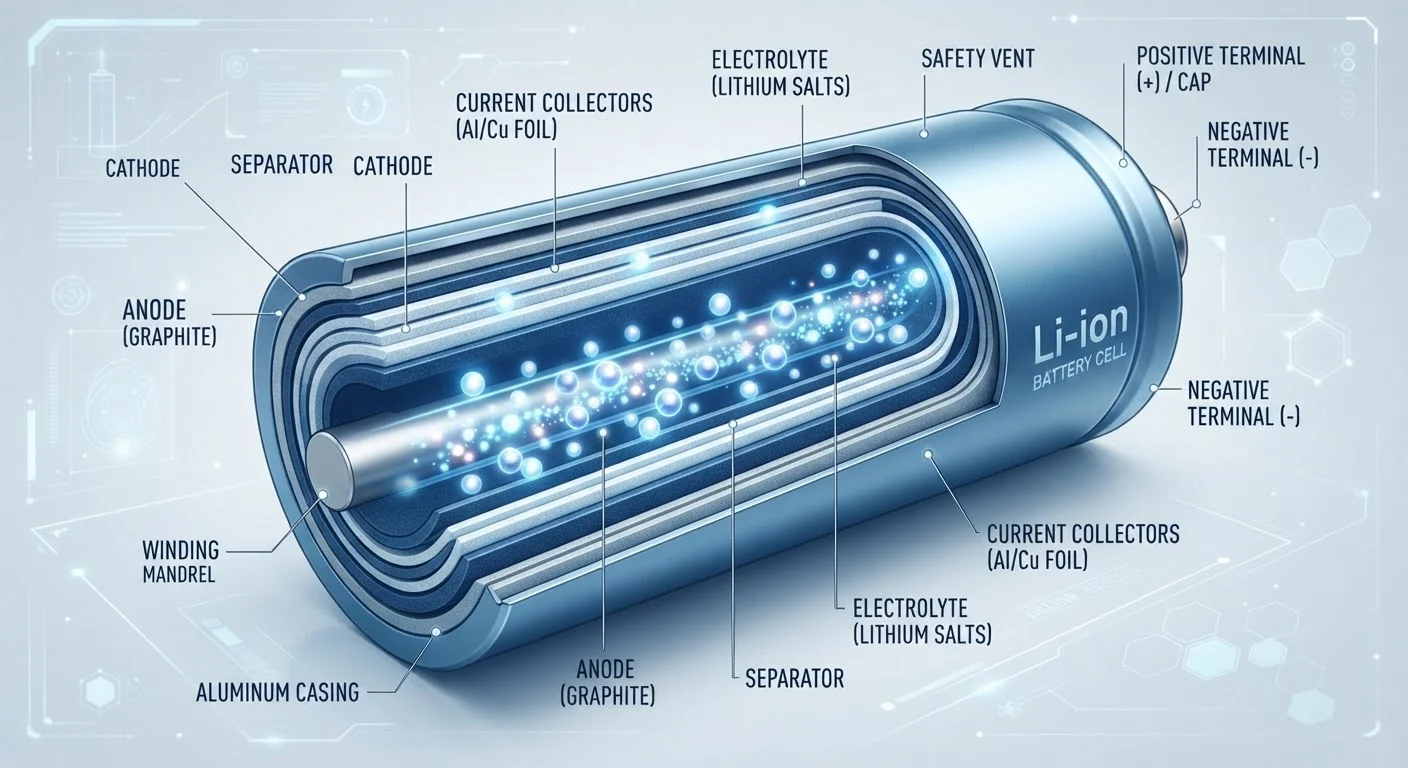
How a Lithium-Ion Battery Actually Works
Inside every Li-ion battery are two electrodes - an anode (typically graphite) and a cathode (often a lithium metal oxide compound) - separated by an electrolyte that allows ions, but not electrons, to pass through. When you discharge a battery by using your device, lithium ions travel from the anode through the electrolyte to the cathode, while electrons flow through the external circuit, powering your screen, processor, or speaker. Charging reverses the process: ions migrate back to the anode and energy is stored again.
This back-and-forth is remarkably efficient compared to older nickel-cadmium or nickel-metal-hydride chemistries. Li-ion cells have a higher energy density - meaning more energy per gram of weight - which is why a thin phone can run all day, and why electric vehicles can achieve meaningful range without enormous battery packs.
The electrolyte separating the electrodes is also a safety boundary. A damaged or overheated cell can cause the electrolyte to break down, releasing gases - which is the mechanism behind the rare but real phenomenon of battery swelling or, in extreme cases, thermal runaway.
Why Batteries Degrade - and What Drives It
Degradation is inevitable, but it isn't random. Every charge cycle causes minor mechanical stress: electrodes expand and contract as ions enter and leave, and over time this creates microscopic cracks. Additionally, a layer called the solid-electrolyte interphase (SEI) grows thicker with each cycle, gradually trapping lithium ions and reducing the pool available to carry charge.
300-500
Typical rated charge cycles before noticeable capacity loss
This is a widely referenced industry benchmark; actual lifespan varies with temperature, depth of discharge, and device-specific chemistry.
~20%
Capacity loss at which most users notice shorter battery life
Apple and other manufacturers define a battery as degraded when it drops below 80% of original capacity, which aligns with user-reported experience thresholds.
2×
Approximate acceleration of degradation at high temperatures
Research into Li-ion aging consistently shows that elevated operating temperatures significantly compress battery service life compared to room-temperature conditions.
Heat accelerates every one of these processes. A battery stored or regularly operated at high temperatures degrades measurably faster than one kept cool. This is why a phone left on a hot car dashboard can age months of battery health in a single afternoon.
Deep discharges - regularly running a battery down to near zero - also stress electrode materials more than shallower cycles. Most battery management systems in modern devices try to prevent true zero-percent discharges for this reason, though the experience still registers as empty to the user.
For a broader look at how these and other assumptions quietly shorten device lifespans, see common habits that ruin gadgets early.
What This Means for How You Use Your Devices
Understanding battery chemistry leads to a few practical, evidence-supported habits. The core principle: lithium-ion cells are happiest in a moderate state of charge - not fully topped up and not fully drained.
The 20-80% Charging Rule of Thumb
Battery researchers often suggest keeping Li-ion devices charged between 20% and 80% to minimize electrode stress. You don't need to obsess over this daily, but avoiding habitual full charges and full discharges - especially in hot conditions - can help your battery hold capacity longer. Many modern devices offer built-in optimized charging modes that automate some of this.
Keeping your device between roughly 20% and 80% charge when possible is a widely cited guideline among battery researchers, though hitting those targets every day is not realistic for most people. Even modest improvements - like avoiding daily charges to 100% and not routinely draining to single digits - can make a measurable difference over a year or two of use.
It's also worth knowing that some Bluetooth usage patterns interact with battery behavior, particularly in wireless headphones and earbuds with small Li-ion cells that cycle more rapidly. Common Bluetooth myths often include exaggerated claims about how much the radio alone drains power, but the truth is more nuanced.
For a full set of practical maintenance habits covering charging, heat, storage, and more, keeping your devices running well for longer is a useful next step.
Frequently Asked Questions
Over time, repeated charging and discharging causes microscopic structural changes inside the battery cells, reducing the total number of lithium ions that can move freely. This shrinks the battery's usable capacity, so it holds less charge than it did when new - even if the battery indicator still shows 100%.
Modern smartphones include charge management circuits that stop drawing power once the battery reaches 100%, so overnight charging is generally not an immediate hazard. However, holding a battery at 100% for extended periods while plugged in can contribute to long-term wear. Many devices now offer scheduled or optimized charging features to address this.
Cold temperatures temporarily slow ion movement inside the battery, which reduces available power and can make a device appear to have much less charge than it actually does. In most cases, capacity returns once the device warms up. Repeated deep-cold exposure can cause longer-term stress, particularly if the battery is charged while very cold.
Most consumer Li-ion batteries are rated to retain roughly 80% of their original capacity after 300-500 full charge cycles under normal conditions. Partial charges count as fractions of a full cycle, so real-world lifespan varies widely depending on usage habits, temperature, and how deeply the battery is routinely discharged.
Battery replaceability varies by device. Some laptops and older phones have user-accessible batteries, while many modern smartphones require professional tools and carry risk of damage if opened incorrectly. Manufacturer service programs and reputable third-party repair shops are the safest routes for most consumers.
The content on this site is for informational purposes only and is not a substitute for professional advice. Always consult a qualified professional for guidance specific to your situation.